1. High-Level Engine Structure
engine.RmdThis article describes how the package handles and runs games at a
high level.
For a description of how the player interacts with the game, see
vignette("guide").
For a walkthrough of creating a game, see
vignette("snake").
1. ROM and RAM
To run a game, we’ll use two objects: the ROM and RAM.1
The ROM (rom.init()) contains everything static for the
game— code, images, and information about how to draw the game.
The RAM (ram.init()) stores everything dynamic— player
coordinates, game timer, current inputs— and is constantly updated as
the game is run.
This structure is particularly convenient for two reasons. For one,
because all game code is stored in one object (the
ROM), games are easy to handle and load— we just need to make the ROM
object and edit it, or load a premade one like
SuperRrio.
The other convenience is that, by storing all dynamic info in one
object (the RAM), we can easily copy that object to
create a savestate— a snapshot of the game at a given moment that can be
saved and loaded later. This allows the engine to be very robust, as any
issues (like an input not registering) can be rolled back (see
vignette("rollback")) to an earlier savestate and rerun
correctly.
2. Making and Running a Game
The basic usage of the engine is structured like this:
- game dev creates and adds game code, art, etc. to ROM object
- player uses ROM to initialize RAM object for playing
- player runs the game using this RAM2
- player starts an additional R session to send inputs to the game
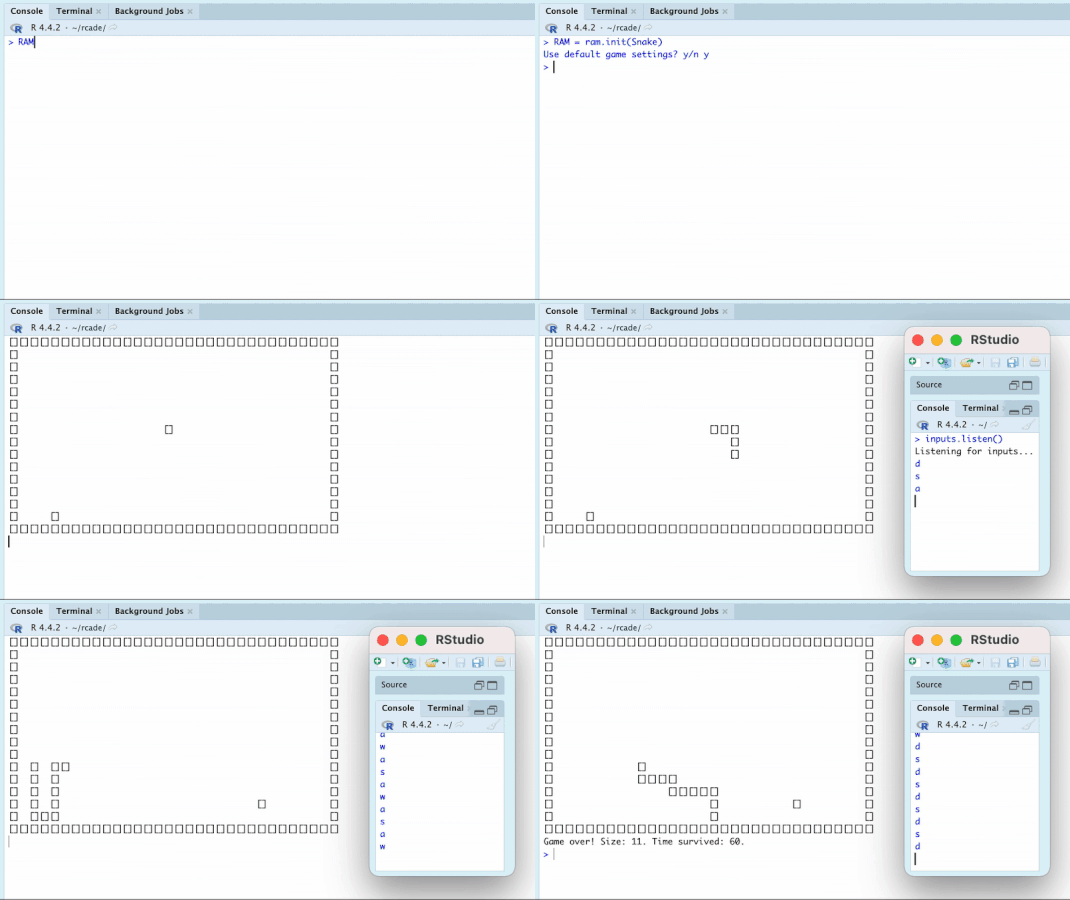
The two R sessions are referred to as the display session, where most of the code happens and the game is drawn, and the input session, where the player sends inputs to the game.
In code, the four steps look like this:
  #1
Game = rom.init({game stuff})
Game$morestuff = {additional game stuff}

  #2
RAM = ram.init(Game)

  #3
RAM = ram.run(Game)

  #4 (in separate session/window)
inputs.listen()
The game then runs constantly and responds to any inputs by the player in the input session.
From here, the player can ^C in the display session to
interrupt (pause) the game and inspect the RAM object, continue the
game, or even edit the ROM.3
Demonstration: [click to expand]
3. The Gameloop
Once the RAM is run, it executes the gameloop over and over. This is where all the code dedicated to running the engine, drawing the game, running game logic, etc. is called.
The gameloop involves four distinct systems:
Game Code: Running the game.
Inputs: Interfacing with the player.
Timing: Executing the gameloop at the right pace.
Rendering: Drawing the game to the console.
Each system has a full article (linked in the sections below) either describing or demonstrating the system.
3.1 Game Code
Game code is run in ROM$custom() and is made by the game
dev. It reads and writes to RAM to do things like respond to player
inputs, move characters around, and trigger events like game end.
3.2 Inputs
The Input system serves to let the player interact with the game live as it runs. It consists of a listener to record player inputs and code to interact with the listener, as well as code to turn recorded inputs into something usable by the Game Code.
The documentation for inputs.get() has a good
description of the input pipeline, from the player pressing keyboard
keys to the input being interpreted by game code.
3.3 Timing
The Timing system ensures that the game runs and draws at the correct
speed. This involves speeding up or slowing down when the game is ahead
or behind of where it “should” be (according to the desired speed,
determined by ROM$framerate), and deciding whether or not
to draw a given tick— for the game to look smooth, drawing must only
happen when the game is “caught up”.
3.4 Rendering
The Rendering system consists of a host of functions dedicated to rendering the current scene—the way objects are organized onscreen on a given tick/gamestate—to the console, which is where the game is displayed.
This involves:
getting the right sprite (image) for each object and putting it in the right place and layer in the scene (
render.sprite())combining the whole scene into one object to be rendered (
render.scene())making this object printable to the console (
render.matrix())
4. Alternative Methods of Interaction
While the default way of interacting with the game is using
ram.run() and inputs.listen(), a couple other
options are available.
4.1 Listener Frame Advance
The live game can be suspended at any time by inputting
/pause in the input session. Then:
The player can input
/tickto advance one tick forward (and draw the scene again).The player can type regular inputs, which will be processed by the game the next time
/tickis called (or the game is resumed).The player can resume live gameplay by inputting
/resume.
This behavior is documented in ?inputs.command. I find
this method to be more convenient than that in the next section, since
staying in the input session allows for more fluid transition between
live and tick-by-tick gameplay.
4.2 Manual Advance
Forgoing the need for the listener session, the game can also be paused and manipulated directly in the display session. This gives the user more control over altering the RAM that may be especially useful for debugging.
This is done by pausing the game with ^C (which ends the
ram.run process). The RAM object can then be manipulated
freely:
RAM = ram.tick(RAM)advances the game one tick.RAM = ram.input(RAM, [input])adds an input to RAM that will be processed on the next tick.RAM = ram.run(RAM)resumes the game (requiring the input session again to interact)
While paused, the RAM can also be easily saved and reloaded by copying it, as in the following code:
5. Gameloop Function Tree
The gameloop consists of the following nesting of functions in order:
-
ram.run()once to start or resume the gameTiming:
-
ram.update()every tick (seevignette("timing"))Inputs:
-
inputs.command()if any commands are sentram.rollback()` if any inputs were received late
Game Code:
-
RAM$ROM$custom()
Rendering:
-
render.ram()ifRAM$time >time.sec()-
render.object()for every object inRAM$objectsrender.animate()if the object’s sprite is animated-
render.sprite()or customobj$draw()
-
-
render.overlay()for every layer inscene$layers
-
-
This tree can also be found in the documentation in
?ram.run.